

Member access to digital membership cards
All members who have registered with St Mary’s either via TidyHQ or Play HQ have access to a digital membership card.
ACTIVE digital cards can be used for ground access.
Access your digital membership card
When members log in via your St Mary’s Sporting Club Tidy page and access your contact profile and active memberships, you will see options to add to Apple Wallet or Google Wallet.

1. Adding to Apple Wallet
When a member clicks “Add to Apple Wallet”, it will automatically ask for your permission to add to your iOS wallet:
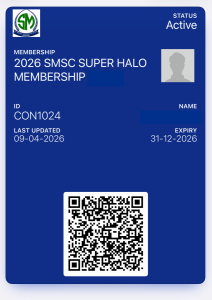
Updates are applied in a few seconds.
2. Adding to Google Wallet
If you select the add to Google Wallet option, similar views will appear on their phones and browsers. However, on Google Wallet, the front page also displays the “text” version of the information in the barcode.
The barcode contains the following information drawn from member profiles:
- Reference number (Contact ID)
- First name
- Last name
- DoB
- Emergency contact person
- Emergency contact number
- Organisation name
- Membership Level name
- Subscription status
- Subscription end date